> ## Documentation Index
> Fetch the complete documentation index at: https://docs.dollarpe.xyz/llms.txt
> Use this file to discover all available pages before exploring further.
# Widget integration
> Embed the DollarPe widget via a hosted link or an iframe using the Widget Initialize API.
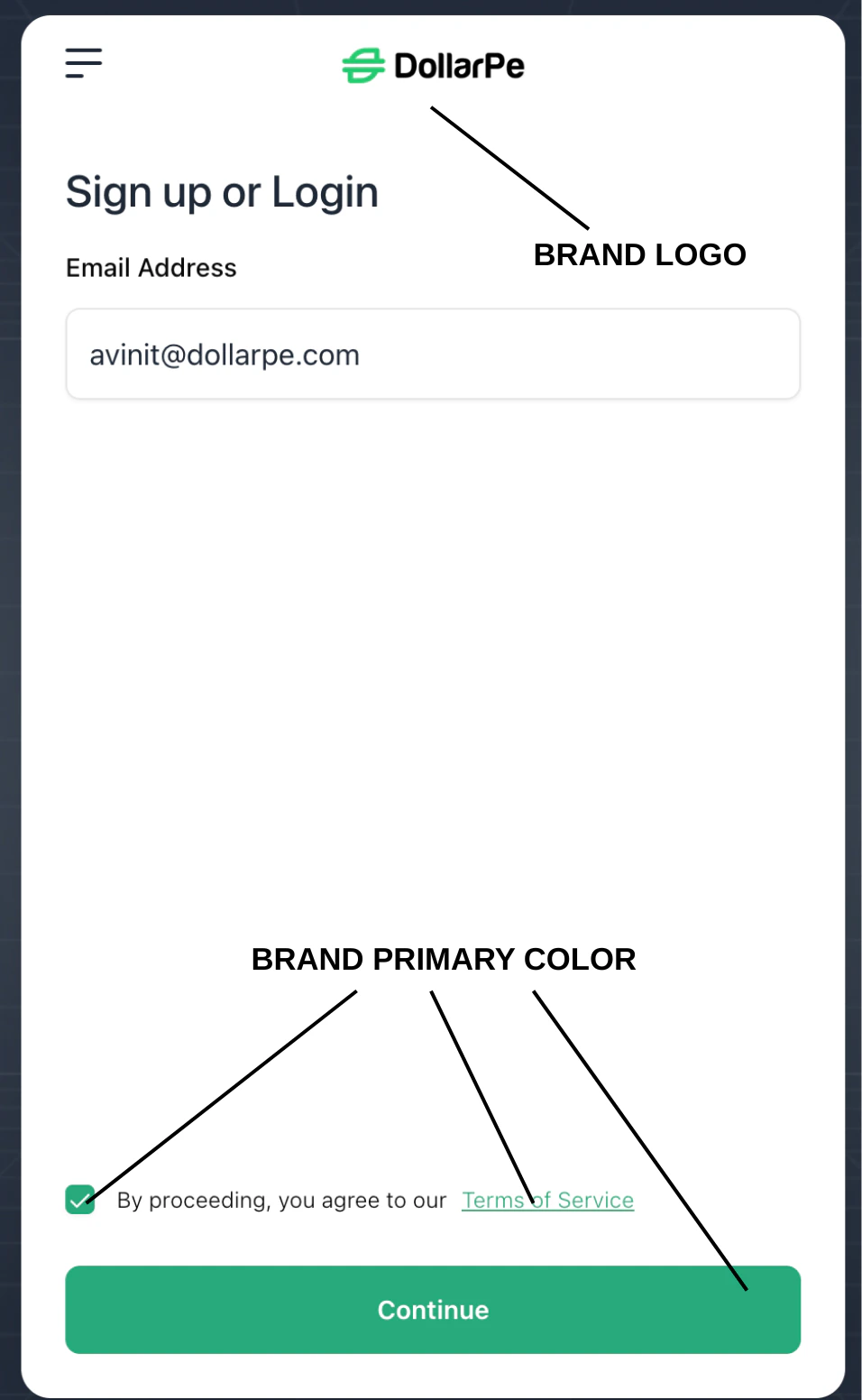
The DollarPe widget covers the full customer journey: onboarding, KYC, bank linking, payin, and payout. Your logo, colors, and email branding apply automatically.
 ## Pick an integration path
Send users to a URL. No backend code required.
Call Widget Initialize from your server, embed the returned URL in an iframe.
| | Hosted mode | iframe (Initialize API) |
| ----------- | ----------------------------------------------- | ----------------------------------------------------------------------------------------------- |
| What you do | Send users to a URL (link, button, or redirect) | Call Widget Initialize on your server, load the returned URL in an `iframe` |
| Best when | You want zero backend logic | You need to pre-fill buy/sell context, amounts, or wallet |
| URL | You build `https://app.dollarpe.xyz?...` | `data.widget_link` from [Widget Initialize](/api-reference-exchange/endpoint/widget/initialize) |
| API secret | Not needed | Keep on the server; pass only `widget_link` to the browser |
For operators using the full browser portal, see [No code options](/guides/integration-guides/no-code-option).
## Hosted mode
Open the widget with your `app_id`:
```
https://app.dollarpe.xyz?app_id={org_app_id}
```
Replace `{org_app_id}` with the value from onboarding. Works on desktop and mobile. You can open it in a new tab, a webview, or an `iframe`.
### Pre-filling parameters
To pre-fill buy or sell parameters before the user lands on the widget, use the [Widget Initialize](/api-reference-exchange/endpoint/widget/initialize) API. Supported parameters are listed in the API reference.
## iframe integration (Initialize API)
Use this when each session needs server-side context: buy or sell flow, amounts, asset, network. Your API secret never goes in frontend code.
Send an authenticated request to [Widget Initialize](/api-reference-exchange/endpoint/widget/initialize) with a buy or sell body. The response includes `data.widget_link`, a URL ready to load in an iframe.
Pass only `widget_link` to the client. Keep signing and auth on the server. See [Authentication](/guides/development-and-testing/authentication) for request headers.
Set `src` on your `iframe` to `widget_link`. The widget loads with your branding and runs the flow end to end.
### iframe example
```html theme={null}
```
Use `allow="camera; microphone"` when KYC includes selfie or document capture inside the widget.
## Branding
Branding is set for your organization during onboarding. To update your logo, colors, or email styling after launch, contact [support@dollarpe.xyz](mailto:support@dollarpe.xyz).
| Item | What it affects |
| --------------- | ----------------------------------------------- |
| Logo | Header and key surfaces in the widget |
| Primary color | Buttons and primary actions |
| Secondary color | Secondary UI and backgrounds |
| Email templates | Onboarding & Transactional emails to your users |
Branding is tied to your `app_id`. Both hosted mode and iframe sessions show the same white label settings.
## Pick an integration path
Send users to a URL. No backend code required.
Call Widget Initialize from your server, embed the returned URL in an iframe.
| | Hosted mode | iframe (Initialize API) |
| ----------- | ----------------------------------------------- | ----------------------------------------------------------------------------------------------- |
| What you do | Send users to a URL (link, button, or redirect) | Call Widget Initialize on your server, load the returned URL in an `iframe` |
| Best when | You want zero backend logic | You need to pre-fill buy/sell context, amounts, or wallet |
| URL | You build `https://app.dollarpe.xyz?...` | `data.widget_link` from [Widget Initialize](/api-reference-exchange/endpoint/widget/initialize) |
| API secret | Not needed | Keep on the server; pass only `widget_link` to the browser |
For operators using the full browser portal, see [No code options](/guides/integration-guides/no-code-option).
## Hosted mode
Open the widget with your `app_id`:
```
https://app.dollarpe.xyz?app_id={org_app_id}
```
Replace `{org_app_id}` with the value from onboarding. Works on desktop and mobile. You can open it in a new tab, a webview, or an `iframe`.
### Pre-filling parameters
To pre-fill buy or sell parameters before the user lands on the widget, use the [Widget Initialize](/api-reference-exchange/endpoint/widget/initialize) API. Supported parameters are listed in the API reference.
## iframe integration (Initialize API)
Use this when each session needs server-side context: buy or sell flow, amounts, asset, network. Your API secret never goes in frontend code.
Send an authenticated request to [Widget Initialize](/api-reference-exchange/endpoint/widget/initialize) with a buy or sell body. The response includes `data.widget_link`, a URL ready to load in an iframe.
Pass only `widget_link` to the client. Keep signing and auth on the server. See [Authentication](/guides/development-and-testing/authentication) for request headers.
Set `src` on your `iframe` to `widget_link`. The widget loads with your branding and runs the flow end to end.
### iframe example
```html theme={null}
```
Use `allow="camera; microphone"` when KYC includes selfie or document capture inside the widget.
## Branding
Branding is set for your organization during onboarding. To update your logo, colors, or email styling after launch, contact [support@dollarpe.xyz](mailto:support@dollarpe.xyz).
| Item | What it affects |
| --------------- | ----------------------------------------------- |
| Logo | Header and key surfaces in the widget |
| Primary color | Buttons and primary actions |
| Secondary color | Secondary UI and backgrounds |
| Email templates | Onboarding & Transactional emails to your users |
Branding is tied to your `app_id`. Both hosted mode and iframe sessions show the same white label settings.